


How to create your own WordPress Website – Creating a website in WordPress is a relatively straightforward process. Here’s a step-by-step guide to help you get started:
Set up a Domain and Hosting
Choose and register a domain name that represents your website.
Select a hosting provider that meets your requirements and purchase a hosting plan.
Install WordPress
Most hosting providers offer a one-click WordPress installation feature. Log in to your hosting account and follow the instructions to install WordPress.
Choose a Theme
Access your WordPress dashboard by visiting “yoursite.com/wp-admin” and logging in with your credentials.
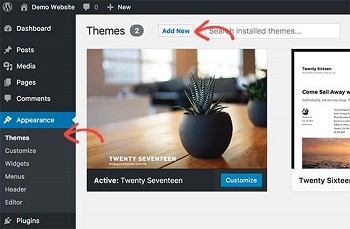
Navigate to “Appearance” and select “Themes.”
Browse through the available free or premium themes, or click on “Add New” to search for specific themes.
Install and activate the theme that best suits your website’s purpose and design preferences.
Customize Your Website
Access the theme customization options by going to “Appearance” and selecting “Customize.”
Customize various aspects of your website, including the site title, logo, colors, fonts, menus, and widget areas.
Depending on your theme, you may have additional customization options like header settings, page templates, and layout options.
Install Essential Plugins
Plugins add functionality to your WordPress website. From the WordPress dashboard, go to “Plugins” and click on “Add New.”
Search for and install plugins that are essential for your website, such as security plugins (e.g., Wordfence), SEO plugins (e.g., Yoast SEO), and caching plugins (e.g., WP Super Cache).
Activate the installed plugins and configure their settings as needed.
Create Pages and Content
Begin creating the main pages of your website, such as Home, About, Services, Contact, etc. From the WordPress dashboard, go to “Pages” and click on “Add New.”
Use the Gutenberg editor or page builder plugins like Elementor or Beaver Builder to design and structure your pages.
Add relevant content, including text, images, videos, and other media elements.
Configure Website Settings
Go to “Settings” in the WordPress dashboard and review and configure various settings, including general settings, reading settings, permalinks, and discussion settings.
Customize your website’s URL structure, set the homepage display, configure comment settings, and more.
Install Additional Plugins and Features
Install additional plugins based on your website’s specific needs and functionality requirements. These may include contact forms, social media integration, e-commerce plugins (e.g., WooCommerce), analytics tools, and more.
Test and Optimize
Preview your website to ensure it looks and functions as intended.
Test the website’s responsiveness on different devices and browsers.
Optimize your website’s performance by optimizing images, enabling caching, and implementing other speed optimization techniques.
Launch Your Website
Once you’re satisfied with your website’s design and functionality, it’s time to launch it. Make your website accessible to the public by removing any “Coming Soon” or maintenance mode pages.
Promote your website through various channels to attract visitors and potential customers.
This is a general overview of the website creation process in WordPress. Depending on your specific needs and preferences, additional steps and customizations may be required.
Let us Assist you with Hosting and Designing your WordPress Website
In the digital age, having a well-designed and functional website is essential for any business or individual looking to establish an online presence. With the help of Hermanus Magazine, you can bring your vision to life and create a captivating website that reflects your brand and engages your target audience. Let’s explore how Hermanus Magazine can guide you through the process of website creation and provide reliable hosting services.
Expertise in Web Design
Hermanus Magazine boasts a team of talented web designers who specialize in creating visually appealing and user-friendly websites. Whether you’re starting from scratch or looking to revamp an existing site, their expertise will ensure a professional and polished online presence.
Tailored Solutions to Meet Your Needs
Recognizing that every client has unique requirements, Hermanus Magazine takes a personalized approach to website creation. They work closely with you to understand your goals, target audience, and desired functionality. By incorporating your ideas and preferences, they craft a tailor-made website that truly represents your brand and aligns with your objectives.
Stunning Visual Design
First impressions matter, especially in the digital realm. With their keen eye for aesthetics, the designers at Hermanus Magazine create visually striking websites that leave a lasting impact. From captivating imagery to carefully chosen color palettes and typography, every element is thoughtfully crafted to enhance the user experience and convey your brand’s identity.
Intuitive User Experience
A well-designed website is not just about looks; it’s also about providing a seamless user experience. Hermanus Magazine ensures that your website is easy to navigate, with clear information architecture and intuitive menus. They optimize page load times, incorporate responsive design principles for mobile devices, and create user-friendly interfaces to enhance overall usability.
Content Management System (CMS)
To empower clients with the ability to manage and update their websites effortlessly, Hermanus Magazine employs popular content management systems like WordPress. This user-friendly platform allows you to add or edit content, upload images, and even integrate additional features through plugins, giving you control over your website’s ongoing maintenance and growth.
Reliable Hosting Services
In addition to website creation, Hermanus Magazine provides reliable hosting services to ensure your website remains accessible and performs optimally. With secure and scalable hosting infrastructure, you can trust that your website will be available to visitors 24/7. Their robust servers offer fast loading times, minimal downtime, and regular backups to safeguard your data.
Ongoing Support and Maintenance
Hermanus Magazine believes in building lasting relationships with their clients. They offer ongoing support and maintenance services to keep your website up to date and secure. Whether you need assistance with regular content updates, troubleshooting, or implementing new features, their dedicated team is always available to provide prompt and reliable support.
When it comes to creating and hosting a website, Hermanus Magazine is your trusted partner. With their expertise in web design, personalized approach, and commitment to delivering stunning websites, they ensure that your online presence stands out from the crowd. From conception to ongoing support, Hermanus Magazine guides you through every step, allowing you to focus on what you do best.
Embrace the digital world with a website that truly represents your brand and captivates your audience, courtesy of Hermanus Magazine.
Pricing
4 / 5 Page Website – Active in 24 Hours once we have all the details R499
eCommerce (Online shop) Active in 24 Hours once we have all the details R999
Uploading products to your online shop R15 per item (Including variats – colours and sizes etc)
Contact us should you require more information